Modifying the Parent Commit of a Historical Commit
Half a year ago, when merging the hotfix branch, the merge direction was reversed, causing the hotfix branch to become the new main branch. There was no solution at the time, but today I revisited the issue and attempted to fix it.
References
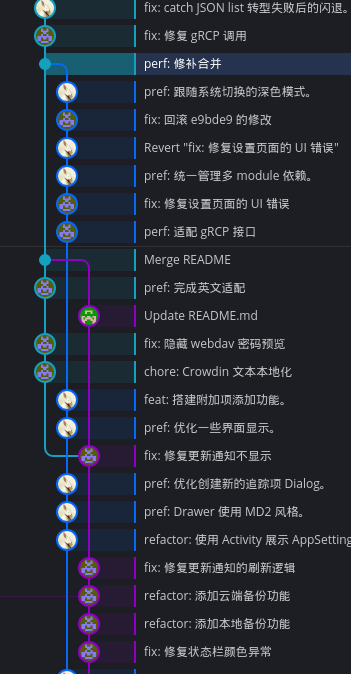
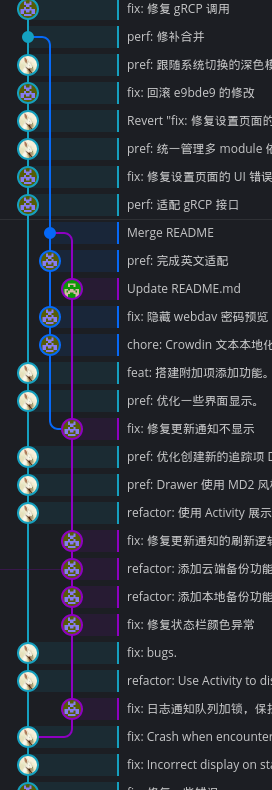
Preview of Results
- Before Fix
- After Fix
Steps
Backup project files (create a compressed archive)
Create a Graft Commit
Switch (modify) the target branch’s information (including parent branches, etc.) (Reference)
git replace --graft <target commit> <main branch parent node> <hotfix branch parent node>Verify Changes
Check if the grafted commit information is correct and meets expectations (the original commit hasn’t been modified yet; it’s only saved in .git/refs/replace/)
View original commit information:
git cat-file commit <target commit>View grafted commit information:
git --no-replace-objects cat-file commit <target commit>Overwrite Original Commit
Install git-filter-repo (requires Git version 2.22 or higher)
Overwrite the commit (Reference):
git filter-repo --forceRebind Remote Repository
git remote add origin <your remote repository URL>Push Changes
Push the changes (required for each branch):
git push -f <branch name>Notify Project Stakeholders
Inform fellow developers to save their current code and re-pull the project 🙂