Playing NieR:Automata on Linux
This article was translated by AI (LLM). There may be errors or inaccuracies. For the original content, please refer to the original version。
This guide uses NieR:Automata running on Steam as an example, with Intel + Nvidia hardware platform.
Generally speaking, most Windows games can be run through wine.
This article is part of the ArchLinux Configuration Guide.
Of course, you can also read it separately.
Installing Nvidia Graphics Drivers
Reference: NVIDIA (Simplified Chinese) (ArchWiki)
Since I chose the Bumblebee solution, only the basic Nvidia drivers need to be installed.
sudo pacman -S nvidia-dkms nvidia-utils lib32-nvidia-utilsInstalling primus_vk
primus_vk is Bumblebee’s Vulkan implementation
Installing Software
sudo pacman -S primus_vkEnabling Service Autostart
sudo systemctl enable bumblebeed.serviceConfiguring Bumblebee
Below is my Bumblebee Nvidia configuration:
# /etc/bumblebee/xorg.conf.nvidia
Section "ServerLayout"
    Identifier  "Layout0"
    #Option "AutoAddDevices" "false"
    Option "AutoAddGPU" "false"
EndSection

Section "InputClass"
    Identifier "IgnoreDevices"
    MatchDevicePath "/dev/input/event*|/dev/input/mouse*|/dev/input/js*|/dev/input/mice"
    Option "Ignore" "true"
EndSection

Section "Device"
    Identifier  "DiscreteNvidia"
    Driver      "nvidia"
    VendorName  "NVIDIA Corporation"

#   If the X server does not automatically detect your VGA device,
#   you can manually set it here.
#   To get the BusID prop, run `lspci | egrep 'VGA|3D'` and input the data
#   as you see in the commented example.
#   This Setting may be needed in some platforms with more than one
#   nvidia card, which may confuse the proprietary driver (e.g.,
#   trying to take ownership of the wrong device). Also needed on Ubuntu 13.04.
#   BusID "PCI:01:00:0"
    BusID "PCI:01:00:0"

#   Setting ProbeAllGpus to false prevents the new proprietary driver
#   instance spawned to try to control the integrated graphics card,
#   which is already being managed outside bumblebee.
#   This option doesn't hurt and it is required on platforms running
#   more than one nvidia graphics card with the proprietary driver.
#   (E.g. Macbook Pro pre-2010 with nVidia 9400M + 9600M GT).
#   If this option is not set, the new Xorg may blacken the screen and
#   render it unusable (unless you have some way to run killall Xorg).
    Option "ProbeAllGpus" "false"

    Option "NoLogo" "true"
    Option "UseEDID" "false"
    Option "UseDisplayDevice" "none"
    # Avoid DPMS timeout
    Option "HardDPMS" "false"
EndSection
Compared to the default configuration, there are the following differences:
- Manually set BusID to avoid graphics card detection issues (without setting this, it almost certainly won’t be found)
- Disabled Nvidia’s DPMS power-saving mechanism to prevent the Nvidia card from automatically downclocking when it detects no input device activity from Xorg (since Bumblebee uses a mapped Xorg environment implementation)
Setting Steam Game Launch Options
Command parameters reference primus_vk issues
As shown in the image:
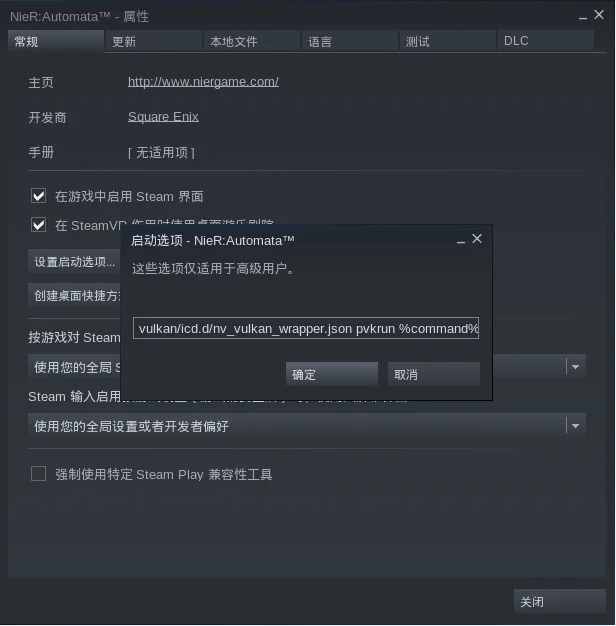
Set the launch options to:
VK_ICD_FILENAMES=/usr/share/vulkan/icd.d/intel_icd.x86_64.json:/usr/share/vulkan/icd.d/nv_vulkan_wrapper.json pvkrun %command%The End
Reboot and Enjoy!