The Revolution of Manual Testing in the AI Era
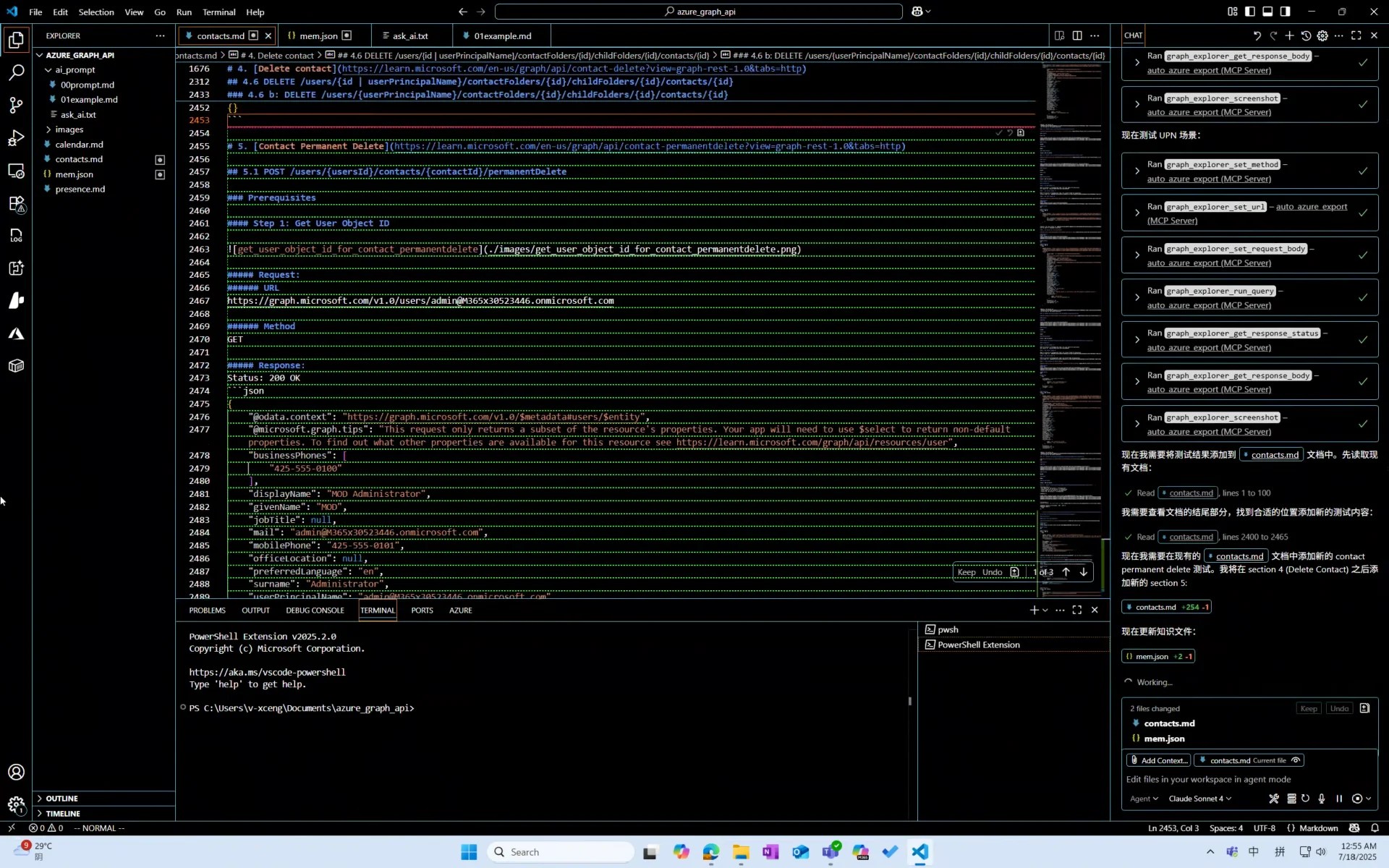
While I was writing this documentation, GitHub Copilot was automating manual testing for me.
You could say I invented an AI Agent for manual testing.
Preface
Since the emergence of GPT, many have claimed that programmers will become obsolete. Yet few have noticed that software testing is actually the first internet profession impacted by this era.
I predict that, much like power plant workers, software test engineers will transition from hands-on practitioners to supervisors of AI testing. However, humans won’t disappear from this field entirely.
Background
As many know, I’m a programmer.
Originally, I was working on an AI-powered tool for Microsoft that automatically generates automated test code. But one day, leadership suddenly decided we couldn’t complete the program within the 20-day deadline. Thus, I was assigned an “urgent” temporary testing task: manually test 400 Microsoft Graph API endpoints within 20 days.
This wasn’t particularly difficult, but it required carefully studying how to call each endpoint, understanding their purposes, and setting up pre-test environments—none of which were simple tasks.
Moreover, I hate manual work. Manual means wasting time focusing on learning skills and knowledge I’ll never use again.
Solution
Prerequisites
- I must perform manual testing—the code volume for automating 400 endpoints would be staggering, including redundant error handling and documentation generation
- Yet I must avoid doing it manually
- When AI makes mistakes, I need to correct them promptly
So what does this resemble? Exactly—AI-assisted programming tools.
Approach
- Which AI to use: GitHub Copilot
- Documentation tooling: VSCode, pandoc (markdown to docx)
- How to make AI understand requirements: Separate prompt.md instructions and example.md format documentation
- How to enable AI to operate testing tools: MCP tool (Playwright, though not perfect)
Implementation
MCP Tool
Auto Azure Export
Playwright-MCP was sufficient, but considering the massive documentation and test cases, it wasn’t ideal for specific needs.
As a mediocre prompt engineer, I needed AI to access minimal data to prevent catastrophic errors.
Thus, spending one hour with GitHub Copilot, I built a Playwright-based MCP wrapper retaining only essential functions:
- Set request URL
- Set request method (GET/POST/…)
- Set request body
- Click send button
- Get HTTP status code
- Get HTTP response body
Playwright MCP
For AI to self-reference documentation when encountering issues.
Optimization
prompt.md
Express thoughts conversationally, one idea per line:
You are a professional tester needing to test Microsoft Graph API documentation.
You must use MCP tools for testing.
Before starting, explain your planned approach.
Complete only one API endpoint's testing and documentation at a time, then ask whether to continue.
Use mem.json to store/update important knowledge.
...
Then let AI optimize this prompt itself. It will review all files and restate instructions in its own understandable format, like numbered testing steps.
The critical role of prompt.md is establishing strict standardized workflows. Regardless of how many times conversations restart, AI maintains consistent working methods—the foundation for large-scale application.
Key Prompt Elements
- Role specification (modern AIs are mixed experts—ensure yours always invokes the specialized model while saving token search time)
- Restate before proceeding (prevents AI derailment and wasted tokens)
- Complete only micro-tasks at once (prevents sudden nonsense/crashes/network errors wasting your time)
mem.json
Enables AI to improve progressively like human testers, growing increasingly accurate.
Through mem.json mechanism, AI transitions from “memory-less” tool to “learning assistant” that accumulates experience and avoids repeating mistakes.
This makes AI testing efficiency increase over time.
Complete System
Try It Yourself
Download sample project azure_graph_api.zip
Unzip it, then check ai_prompt/ask_ai.txt using Sonnet 4 to experience the “magic.”
Summary
- First determine and stick with an AI model. For prompts, the model matters—identical prompts might make GPT-4 hallucinate.
- Prompts are “memory.” For AI, prompts are crucial—they can’t truly “remember” through conversation. Thus we need files to assist.
- Know when to abandon your AI. When it suddenly underperforms, don’t try salvaging context—restart with your docs and mem.json.
- AI struggles with rules. Frequent improvisation necessitates points two and three, plus a less “intelligent” MCP.
Further Improvements?
- Increased automation: Deploy a local AI Agent to automate VSCode GUI interactions—auto-typing “continue,” clicking buttons, monitoring Copilot. When errors occur, the local Agent alerts us, realizing the “supervisor era” of manual testing.
- Custom MCP for documentation formatting: For long-term tools, implement documentation-generating MCP—you won’t want AI randomly altering formats nor constantly monitoring.
The Future?
I believe future AI will recognize when to self-author MCPs to standardize its behavior.
Final Thoughts
Perhaps someday, computational power will reduce optimization needs, letting AI generate programs entirely. Platforms like GitHub may shift focus from sharing code logic to exchanging prompts and AI models.